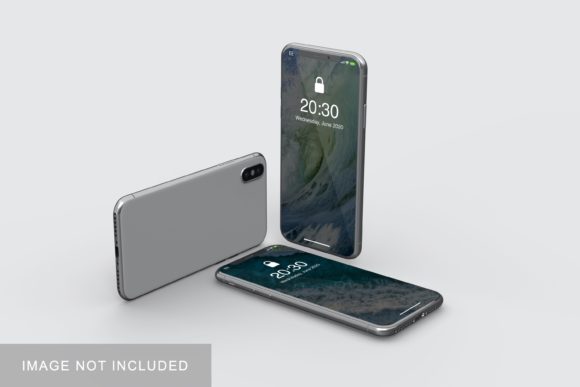
IPhone X Mockup V2
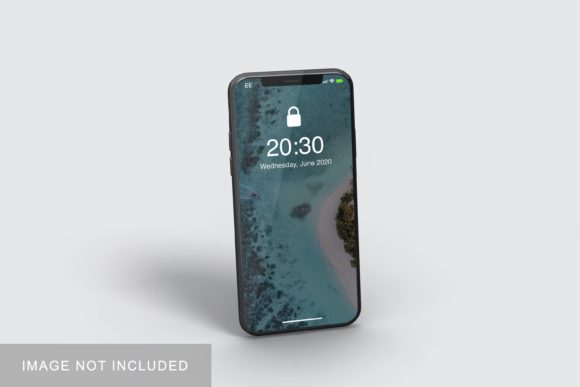
Let’s be honest: presenting a design on a flat, white background rarely does it justice. Whether you are a UI/UX designer showcasing a new app interface, a marketer preparing assets for a social media campaign, or a small business owner launching a mobile-first website, the context in which your work is displayed matters just as much as the work itself. This is where IPhone X Mockup V2 steps in as an essential tool in your digital workflow. It isn’t just a picture of a phone; it is a realistic 3D display solution designed to help you present your creative projects professionally.
If you have ever struggled with making your designs look "real" without spending hours learning complex 3D modeling software, this mockup addresses that exact pain point. It bridges the gap between raw design files and polished, client-ready presentations. By using this resource, you can transform static screens into tangible, relatable devices that potential clients or users can instantly recognize and appreciate.
Why Realism Matters in Digital Presentations
In today’s visual-heavy landscape, first impressions are formed in seconds. When you send a portfolio piece or a marketing asset, you want the recipient to visualize how your design will look in their actual pocket. A generic screenshot feels abstract. An iPhone mockup feels concrete. It grounds your idea in reality.
IPhone X Mockup V2 leverages high-fidelity rendering to create a device that looks authentic. The curves, the screen bezels, and the lighting reflections are crafted to mimic real-world photography. This level of detail helps build trust. When a freelancer shows a client a sleek, realistic iPhone displaying their branding, it signals professionalism and attention to detail. It suggests that the designer cares about the final user experience, not just the code or the pixels.
Who Benefits from Using This Mockup?
The versatility of this tool means it serves a wide array of professionals and hobbyists. Here is how different users can apply IPhone X Mockup V2 in their daily routines:
- UI/UX Designers: You have spent hours perfecting button placements and color palettes. Don’t let them get lost in a spreadsheet-like view. Use the mockup to show stakeholders how the app flows on a familiar device. It helps non-technical clients understand the spatial relationship between elements.
- Digital Marketers & Bloggers: If you are writing a review about a new app or promoting a mobile-friendly service, standard screenshots often look cluttered on a blog post. Placing your graphic inside the clean lines of the iPhone X creates a visually appealing focal point that draws the reader’s eye.
- Freelancers & Agencies: When pitching to clients, presentation is half the battle. High-quality mockups allow you to charge premium rates by elevating the perceived value of your deliverables. It transforms a simple JPG export into a branded artifact.
- Small Business Owners: Even if you aren’t a designer, you might need to create promotional graphics for Instagram or Facebook ads. Using a pre-made mockup ensures your business logo or promotional offer looks consistent and professional across all platforms.
How Smart-Objects Make Your Workflow Faster
The technical backbone of IPhone X Mockup V2 is its compatibility with Adobe Photoshop via smart-object features. For those who are not designers, "smart-object" might sound like jargon, but practically speaking, it is a time-saving magic trick.
Traditionally, placing a design onto a curved screen requires manual warping, masking, and blending modes—a process that can take twenty minutes per image and often results in misaligned edges. With smart-objects, the process is reduced to a few clicks:
- Open the PSD file.
- Double-click the smart-object layer (usually labeled "Your Design Here").
- Paste or place your own artwork into the window that opens.
- Save and close the window.
- Your design automatically maps onto the phone screen with correct perspective and shadows.
This feature allows you to swap out designs within seconds. If you are creating a series of images for a social media campaign—perhaps showing three different app screens—you can duplicate the mockup file, change the inner content, and have three unique, realistic renders ready in minutes rather than hours.
Technical Specifications That Support Quality Output
While ease of use is critical, resolution and flexibility are equally important for professional output. IPhone X Mockup V2 comes equipped with specifications that cater to both web and print needs.
The file size is set at 3000x2000 pixels with a resolution of 300 DPI. Why does this matter? 300 DPI is the industry standard for high-quality printing. If you plan to include your mockup in a printed portfolio, a business card, or a large-format poster, this resolution ensures your text remains crisp and your images do not appear pixelated. For web use, you can easily downsample the image without losing quality during the initial creation phase.
Additionally, the mockup includes a changeable background-color feature. This is a subtle but powerful aspect of the design. Maybe your brand colors are bold red and black, and a white background clashes with your aesthetic. Or perhaps you are designing for a dark-mode application, and a light background distracts from the screen content. Being able to adjust the background seamlessly allows you to control the mood and contrast of the final image, ensuring your design stands out appropriately.
Practical Scenarios for Application
To better understand the utility of this tool, consider these specific scenarios:
The App Launch: Imagine you have just developed a fitness tracking app. You need to launch it on the App Store. Apple requires specific screenshots, but they also look better when presented in context. Using the mockup, you can create a cohesive set of store images that show the app in action on a recognizable device, increasing click-through rates.
The Educational Workshop: Educators teaching graphic design principles can use this mockup to demonstrate the importance of negative space and typography on mobile interfaces. Students can experiment with different layouts and immediately see how their choices affect readability on a simulated screen.
The E-commerce Banner: A clothing retailer wants to promote their new mobile shopping app. They create a banner ad featuring a hand holding the iPhone X mockup, displaying a sale item on the screen. This contextualizes the convenience of mobile shopping, making the call-to-action more compelling than a plain text ad.
Things to Consider Before You Start
While IPhone X Mockup V2 is a robust tool, there are a few practical considerations to keep in mind to get the best results.
First, ensure you are using a version of Adobe Photoshop that supports smart-objects, which is virtually all modern versions (CS6 and later). Second, remember that the photos used in preview images are for illustration purposes only and are not included in the download. You must supply your own design assets.
Also, pay attention to the aspect ratio. The iPhone X has a specific screen ratio. If your design is intended for a different device, such as an older iPhone with a home button or a newer model with a notch, you may need to adjust your canvas or choose a different mockup to ensure accurate representation. However, for projects targeting the iPhone X era or general mobile aesthetics, this mockup provides an excellent standard.
Finally, always check the license agreement associated with the download. Most mockups allow for personal and commercial use, but some may restrict resale of the mockup itself as a standalone product. As long as you are using it to showcase your own original designs, you are typically on safe ground.
Conclusion
Ultimately, IPhone X Mockup V2 is about efficiency and impact. It removes the technical barriers to creating professional-looking design presentations. Whether you are a seasoned pro looking to speed up your workflow or a beginner wanting to make your portfolio stand out, this tool offers a straightforward path to better visuals. By combining realistic 3D aesthetics with the simplicity of smart-objects, it allows you to focus on what truly matters: your creative ideas. In a world where digital presence is paramount, having the right tools to display your work effectively is not just a luxury—it is a necessity.