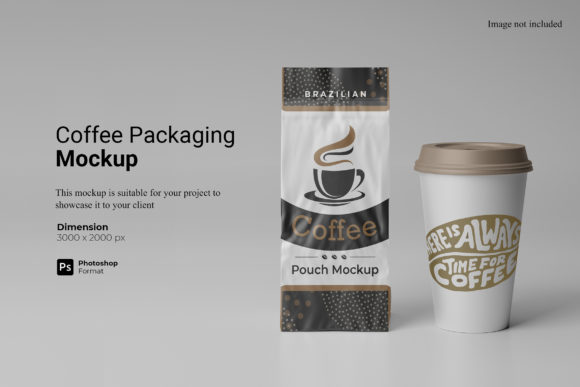
Coffee Packaging Mockup for Professional Branding
In the competitive world of coffee, the first sip is often visual. Before a customer tastes the roast, they evaluate the bag. This is where a Coffee Packaging Mockup becomes an indispensable tool for designers, roasters, and marketing teams. It serves as a bridge between a flat digital file and a tangible product reality, allowing you to present your brand in a context that resonates with consumers.
This specific resource is designed to showcase your designs professionally in a realistic 3D display. Instead of relying on generic templates or expensive photoshoots, you can use this item to create high-fidelity presentations that look authentic. The ability to visualize your label on a properly lit, textured coffee bag helps stakeholders understand how the final product will appear on a shelf or in an e-commerce thumbnail.
Why Realistic Visualization Matters
Gone are the days when a simple JPEG of a logo was enough to secure client approval or launch a new product line. Modern consumers are discerning. They expect packaging to feel premium, tactile, and well-designed. A flat image fails to convey depth, material quality, or how light interacts with foil and matte finishes.
By using a Coffee Packaging Mockup, you address these expectations immediately. It allows you to:
- Validate Design Choices: See if your typography remains legible when curved around the edges of a bag.
- Communicate Quality: Demonstrate how your design complements the physical texture of the packaging material.
- Streamline Approval Processes: Present polished visuals to clients or investors, reducing back-and-forth revisions caused by misinterpretation of flat layouts.
For freelancers and agencies, this means faster turnaround times and higher perceived value. For independent roasters, it means launching with confidence, knowing your branding looks as good online as it does in the local market.
Technical Specifications and Ease of Use
The core strength of this mockup lies in its technical accessibility. It is available in PSD Photoshop format with smart-object features. This is a critical detail for anyone who needs to replace the current designs with their own within seconds. You do not need advanced 3D modeling skills or expensive software beyond Adobe Photoshop.
Smart-Object Workflow
The integration of smart objects simplifies the editing process significantly. When you open the file, you will find designated layers that act as placeholders. To apply your design:
- Open your artwork in Photoshop.
- Copy and paste it into the smart-object layer provided in the mockup.
- The design automatically warps, shadows, and blends onto the coffee bag surface.
- Synchronize the changes, and your presentation is ready.
This workflow ensures that your graphics maintain their resolution and alignment, regardless of the perspective of the bag. It eliminates the tedious manual manipulation of pixels, allowing you to focus on creativity rather than technical troubleshooting.
High-Resolution Standards
Professional output requires professional resolution. This template boasts a 300 dpi resolution with a size of 3000x2000 px. These dimensions are more than sufficient for:
- High-quality print brochures and lookbooks.
- Retina displays on websites and social media platforms.
- Large-format printing for trade shows or retail displays.
At this resolution, fine details in your typography and intricate graphic elements remain crisp and clear. There is no pixelation, even when zooming in on specific areas of the packaging. This ensures that your brand identity is communicated with precision and clarity.
Customization and Flexibility
One of the standout features of this Coffee Packaging Mockup is the ability to change the background color. In design presentations, the background sets the mood. A neutral white background might suit a minimalist, clean aesthetic, while a dark charcoal or warm earth tone could enhance the richness of a dark roast brand.
This flexibility allows you to tailor the visual context to match your brand’s personality. Whether you are showcasing a single-origin Ethiopian bean with a rustic vibe or a sleek, modern espresso blend, you can adjust the environment to support the narrative of your product.
Additionally, the package includes a PDF help guide. While the smart-object system is intuitive, having a step-by-step reference document is valuable for team members who may be less familiar with Photoshop. It reduces the learning curve and ensures consistency across different users working on the same project.
Practical Applications Across Industries
The utility of this mockup extends far beyond just selling coffee bags. Here is how various professionals can leverage this asset:
Designers and Agencies
Use the mockup to create portfolio pieces that demonstrate real-world application. Clients want to see how a logo lives on a product, not just on a screen. Presenting your work in this format elevates your professionalism and showcases your attention to detail.
Entrepreneurs and Small Business Owners
If you are launching a new coffee brand, you likely have a limited budget for photography. This mockup provides a cost-effective alternative to hiring a photographer and renting a studio. You can generate multiple variations of your packaging design without additional costs, allowing you to test different concepts before committing to mass production.
Educators and Students
For educators teaching branding or packaging design, this tool offers a practical way to grade student work. Students can submit their designs rendered in a realistic context, providing a more accurate assessment of their ability to apply design principles to three-dimensional objects.
Marketers and Content Creators
Marketing campaigns require consistent visual assets. You can use this mockup to create social media posts, email headers, and ad creatives that feature your product consistently. The ability to quickly swap out designs means you can keep your content fresh and relevant without starting from scratch each time.
Important Considerations
While this tool is powerful, it is important to remember that photos used in the preview are not included; they are for illustration purposes only. This is standard practice in the design industry, but it underscores the importance of having your own high-quality artwork ready. The mockup is only as good as the design placed inside it.
Furthermore, ensure that your source files are optimized for the specific dimensions of the smart object. If your design is too small, it may appear pixelated after scaling up. Conversely, if it is too large, it may get cropped. Always check the alignment and scale before finalizing your presentation.
Conclusion
A Coffee Packaging Mockup is more than just a template; it is a strategic asset for anyone involved in product design and branding. By combining realistic 3D visualization with user-friendly smart-object technology, it bridges the gap between concept and reality. With its high resolution, customizable backgrounds, and straightforward workflow, it empowers creators to present their work with confidence and professionalism. Whether you are a seasoned agency director or a startup founder, this tool can streamline your design process and enhance the impact of your visual communication.