Maximizing Professional Impact: A Comprehensive Guide to Using Realistic Magazine Mockups in Design Workflows
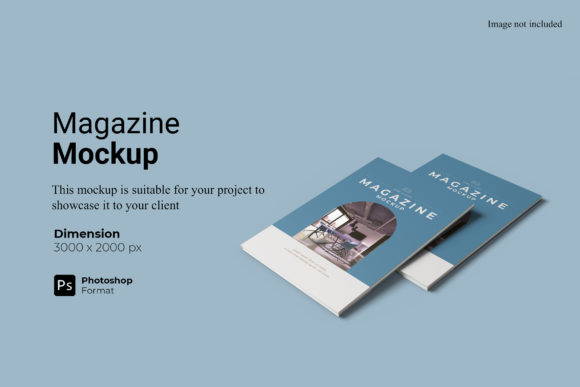
In the competitive landscape of graphic design and digital marketing, the presentation of a final product is often just as critical as the design itself. A beautifully crafted layout can lose its impact if it is displayed on a flat, generic background that fails to convey scale, texture, or context. This is where high-fidelity visual aids become indispensable tools for creatives. Specifically, the Realistic Magazine Mockup has emerged as a premier resource for designers seeking to bridge the gap between digital files and tangible reality. By leveraging this tool, professionals can showcase their work in a manner that resonates with clients, stakeholders, and end-users alike.
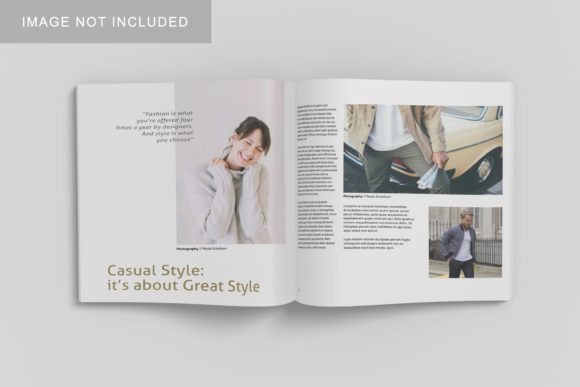
The core value of a realistic magazine mockup lies in its ability to simulate physical media within a digital environment. It transforms a two-dimensional PDF or image file into a three-dimensional object that appears to exist in a real-world space. This simulation provides depth, lighting effects, shadows, and material textures that help viewers understand how the printed piece will look when held, placed on a desk, or viewed in a retail setting. For educators, researchers, and hobbyists, these mockups offer a way to visualize academic journals, portfolios, and creative projects with professional polish without the need for expensive physical printing.
The Mechanics of Smart-Object Integration
One of the most significant advantages of using a Realistic Magazine Mockup in PSD Photoshop format is the integration of smart-object features. Understanding how these features function is crucial for maximizing efficiency and maintaining quality throughout the design process. Smart objects are layers in Photoshop that contain image data from raster or vector images, preserving an image’s resolution and other properties while allowing non-destructive editing.
- Non-Destructive Editing: When you place your design into a smart object, any changes you make to the original design layer automatically update within the mockup. This means you can tweak colors, adjust typography, or swap images without having to re-export or re-link files manually.
- Rapid Iteration: The ability to replace designs easily and quickly is a game-changer for agencies and freelancers who need to present multiple variations to a client. With smart objects, swapping out a cover design takes seconds rather than minutes, allowing for faster decision-making cycles.
- Resolution Preservation: High-quality mockups ensure that your design remains crisp and clear. The Realistic Magazine Mockup typically supports high-resolution outputs, ensuring that fine details in your typography and imagery are not lost during the rendering process.
This technical capability reduces the friction between creation and presentation. Designers no longer need to be experts in 3D rendering software like Blender or Cinema 4D to achieve photorealistic results. The complexity of lighting and perspective is pre-calculated, leaving the designer to focus solely on the content of their publication.
Technical Specifications and Quality Standards
For a mockup to serve its purpose effectively, it must meet rigorous technical standards. The specifications of the Realistic Magazine Mockup are designed to cater to both screen-based viewing and high-quality print reproduction. Understanding these metrics helps users determine if the asset aligns with their project requirements.
The standard size for this type of mockup is often set at 3000x2000 pixels. This aspect ratio provides ample horizontal space, which is ideal for showcasing wide-format magazines, brochures, or catalog spreads. More importantly, the resolution is maintained at 300 DPI (dots per inch). This is the industry standard for print-ready materials. If a designer intends to use the mockup image in a printed portfolio or a large-format advertisement, 300 DPI ensures that the image does not appear pixelated or blurry when scaled up.
Furthermore, the inclusion of changeable background-color options adds versatility to the asset. While many mockups come with a fixed studio backdrop, the ability to alter the background allows designers to match the aesthetic of their brand or the specific mood they wish to convey. Whether a clean white background is needed for a minimalist corporate report or a textured wooden surface is desired for a lifestyle-focused hobbyist zine, the flexibility to modify the environment enhances the contextual relevance of the presentation.
Practical Applications Across Industries
The utility of a Realistic Magazine Mockup extends far beyond traditional publishing houses. Its adaptability makes it suitable for a broad audience, including business owners, educators, and independent creators. Below are several key areas where this tool proves particularly valuable.
Corporate Branding and Marketing
Business owners and marketing managers often produce annual reports, product catalogs, and internal newsletters. Presenting these documents in a flat PDF format can feel impersonal and disconnected. By using a realistic mockup, companies can demonstrate how their brand identity translates into physical form. A well-designed magazine mockup can highlight the tactile quality of premium paper stocks and the vibrancy of ink colors, thereby increasing the perceived value of the brand.
Academic and Educational Publishing
Educators and researchers frequently compile their findings into journals, thesis collections, or course readers. These documents often require a formal and authoritative presentation. A realistic mockup provides the gravitas associated with established academic publishers. It allows students and professors to visualize their research in a format that mimics peer-reviewed publications, aiding in the dissemination of knowledge and the professionalization of academic work.
Portfolio Development for Creatives
For graphic designers, photographers, and illustrators, a portfolio is the primary tool for securing employment or commissions. Showcasing a series of illustrations or photographs within the pages of a magazine mockup tells a story about the creator’s ability to handle layout, hierarchy, and flow. It demonstrates not just artistic skill, but also editorial judgment. This holistic view is essential for hiring managers who need to assess a candidate’s readiness for professional environments.
Hobbyist and Independent Projects
Zine makers, indie authors, and craft enthusiasts benefit significantly from accessible mockup tools. Producing physical copies of small-batch publications can be costly. Before committing to a print run, creators can use the Realistic Magazine Mockup to preview the final product. This allows for error checking and aesthetic adjustments without financial risk. It democratizes the ability to present work professionally, regardless of budget constraints.
Workflow Optimization and User Experience
Efficiency is a cornerstone of successful design workflows. The Realistic Magazine Mockup is engineered to minimize the time spent on presentation tasks. The availability of a PDF help guide further streamlines this process, ensuring that users, even those with less experience in Photoshop, can navigate the file structure with confidence.
The workflow typically begins with the completion of the design file. Once the artwork is finalized, the user opens the PSD mockup file. They locate the designated smart object layer, double-click to open it, and paste their design. After saving and closing the smart object window, the mockup updates instantly. The lighting, shadows, and perspective adjust dynamically to fit the new content. This seamless integration means that a designer can prepare a full suite of presentation assets in a fraction of the time it would take using manual compositing techniques.
Additionally, the ease of use reduces the cognitive load on the designer. Instead of worrying about vanishing points, ambient occlusion, or color grading, the creative energy is preserved for the actual design work. This separation of concerns allows for a more focused and productive creative session.
Considerations and Best Practices
While the benefits are substantial, there are considerations to keep in mind when utilizing realistic magazine mockups. First, it is important to remember that the photos used in previews are for illustration purposes only. Users should not assume that the lighting conditions in a stock preview represent the exact output they will receive. Always test the mockup with your own content to verify color accuracy and contrast levels.
Secondly, file management is key. Because smart objects embed the design within the mockup file, it is easy to lose track of the original source files. Designers should maintain a organized folder structure, keeping the PSD mockup, the source design files, and the exported presentations separate yet linked. This practice prevents broken links and ensures that future edits can be made efficiently.
Finally, while digital mockups are powerful, they are simulations. They cannot fully replicate the tactile experience of holding a printed magazine—the weight of the paper, the smell of the ink, or the finish of a matte coating. Therefore, for high-stakes projects, it is advisable to combine digital presentations with physical proofs whenever possible. The mockup serves as a compelling preview, but the physical product remains the ultimate benchmark of quality.
Conclusion
The adoption of a Realistic Magazine Mockup represents a strategic upgrade in how design work is communicated and valued. By combining high-resolution technical specifications with user-friendly smart-object technology, it bridges the gap between digital creation and physical perception. Whether for corporate branding, academic publishing, or personal creative expression, this tool empowers users to present their work with clarity, professionalism, and impact. As the demand for high-quality visual communication continues to grow, mastering such tools becomes an essential competency for anyone involved in the design and production of printed media.