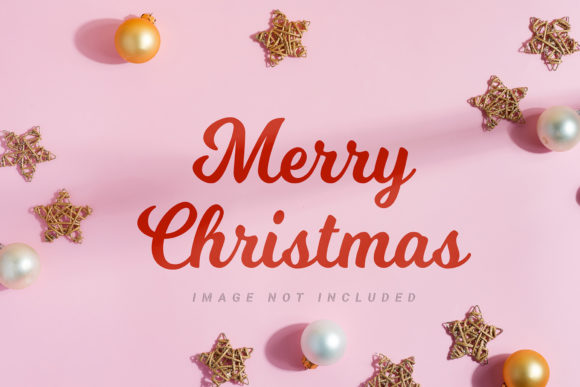
Merry Christmas Paper Mockup: A Versatile Tool for Holiday Design
The holiday season brings a unique set of challenges for designers, content creators, and business owners. The demand for festive visuals is high, but creating original, high-quality imagery from scratch can be time-consuming and resource-intensive. This is where the Merry Christmas Paper Mockup becomes an invaluable asset. Designed with both aesthetics and functionality in mind, this bundle offers a streamlined solution for anyone looking to elevate their holiday marketing materials, social media posts, or personal projects.
Unlike complex 3D renders that require significant processing power and technical expertise, this mockup leverages the simplicity and realism of photography. It provides a tangible, paper-based aesthetic that resonates deeply with consumers during the winter holidays. By using this tool, you can transform flat designs into realistic, engaging visual assets in minutes rather than hours.
Understanding the Core Concept
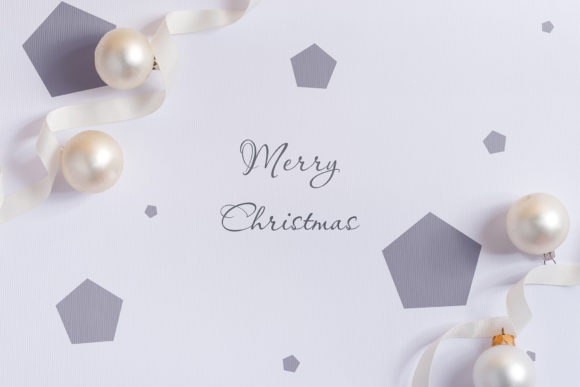
At its heart, the Merry Christmas Paper Mockup is a collection of high-resolution photographic backgrounds designed to showcase your creative work. Whether you are designing a greeting card, a promotional flyer, or a blog header, these mockups provide a realistic context for your graphics. The "paper" aspect refers to the texture and materiality of the background, which mimics the look of high-quality cardstock or textured paper often associated with traditional holiday stationery.
This approach differs significantly from vector-based or purely digital 3D environments. Because it is based on actual photography, the lighting, shadows, and textures feel authentic. This authenticity helps build trust with your audience, as it feels less like a generic template and more like a curated, professional design piece. For entrepreneurs and small business owners, this distinction is crucial in standing out in a crowded digital marketplace.
Key Features and Technical Specifications
To fully appreciate the utility of this mockup bundle, it is helpful to understand the technical details that make it user-friendly and versatile. The package is designed with the end-user’s workflow in mind, ensuring that even those with limited graphic design experience can achieve professional results.
High-Resolution Quality
All photos included in the archive are provided at full resolution. Specifically, the files are available in two primary orientations:
- Landscape: 6016 × 4016 pixels
- Portrait: 4016 × 6016 pixels
Both dimensions are rendered at 300 DPI (dots per inch), which is the standard requirement for high-quality printing. This ensures that whether you are using the images for digital screens or physical print materials, the output remains crisp and clear without pixelation.
Smart Objects and Safety Zones
The most powerful feature of this mockup is the integration of Active Smart Objects. In Adobe Photoshop and similar editing software, a smart object allows you to embed your design non-destructively. This means you can drop your artwork into the designated area, and the software automatically maps it onto the paper surface, accounting for perspective and lighting.
A critical component of this system is the Safety Zone. Often overlooked, the safety zone defines the boundaries within which your design should remain to ensure it looks natural on the mockup. These zones are indicated by specific lines or layers that are not included in the final smart object rendering. By activating these layers, you can see exactly where your text or graphics will sit relative to the edges of the paper. This prevents awkward cropping or designs that spill over into unrealistic areas, saving you from tedious manual adjustments.
Ease of Use
The workflow is intentionally simple. You do not need to manually warp, distort, or blend your images. Instead, you simply paste your design into the smart object layer and save the file. The mockup updates instantly. Additionally, the archive includes a greeting file and detailed file instructions, guiding you through the process step-by-step. This support structure reduces the learning curve, allowing you to focus on creativity rather than troubleshooting technical issues.
Practical Applications Across Industries
The versatility of the Merry Christmas Paper Mockup makes it suitable for a wide range of users and industries. Its neutral yet festive nature allows it to adapt to various brand identities and project types.
Social Media Marketing
For Instagram, Facebook, and Pinterest, visual appeal is paramount. Businesses can use these mockups as headers or hero images to announce holiday sales, new product launches, or seasonal greetings. The ample space provided by the mockup layouts allows for bold headlines and compelling copy, ensuring your message is read alongside your visual branding.
Digital Publishing and Blogging
Bloggers and online publishers often struggle to find relevant, high-quality featured images. Using this mockup as a background for blog post headers adds a layer of professionalism and thematic relevance. It creates a cohesive look for your website’s holiday section, enhancing user engagement and time-on-site.
E-commerce and Product Photography
Entrepreneurs selling physical goods, such as jewelry, cosmetics, or handmade crafts, can benefit greatly from these mockups. By placing their product packaging or labels onto the paper surfaces, they can create lifestyle shots that show how their products might look as gifts. This contextualization helps customers visualize the item in a real-world scenario, potentially increasing conversion rates.
Print Materials
Due to the 300 DPI resolution, these files are also ideal for preparing print-ready materials. Magazines, local newspapers, and small businesses can use these mockups to proofread layouts before sending them to press. The ability to crop the images further allows designers to extract specific sections for flyers, business cards, or invitation cards.
Important Considerations and Limitations
While the Merry Christmas Paper Mockup is a robust tool, it is important to have realistic expectations regarding its capabilities. Understanding these limitations will help you integrate it effectively into your workflow.
No 3D Interactivity
It is essential to note that this is a photo, not a 3D model or vector file. This means you cannot rotate the camera angle or change the viewpoint after the fact. The perspective is fixed based on the original photograph. While this limits flexibility in terms of angle, it ensures consistency and realism that dynamic 3D renders sometimes lack due to artificial lighting artifacts.
Static Backgrounds
The background color and design elements of the mockup itself do not change dynamically. If you need a completely different color scheme for the paper texture, you would need to edit the base image separately. However, this static nature is also a strength, as it guarantees that the festive theme remains consistent across all your generated assets.
Typography Exclusions
Please be aware that design applied typography is NOT INCLUDED. The mockup provides the canvas, but you must supply your own text. This encourages customization and ensures that your messaging aligns perfectly with your brand voice. It also avoids potential licensing issues associated with pre-loaded fonts.
Evaluating Suitability for Your Needs
When deciding whether to incorporate the Merry Christmas Paper Mockup into your toolkit, consider your current design process and goals. If you frequently create holiday-themed content and spend significant time setting up scenes in 3D software or sourcing stock photos, this bundle offers a significant efficiency boost. It is particularly beneficial for solo entrepreneurs, freelancers, and small teams who need to produce high volumes of content quickly.
Furthermore, if your brand identity relies on a warm, tactile, and organic feel, the paper texture of this mockup aligns well with those values. Conversely, if your brand is strictly futuristic, neon-lit, or minimalist in a digital sense, you might find the rustic paper aesthetic less compatible. In such cases, you may need to adjust the styling of your designs to bridge the gap between the modern brand identity and the traditional mockup style.
Conclusion
The Merry Christmas Paper Mockup represents a thoughtful intersection of convenience and quality. By providing high-resolution, easy-to-use templates with smart object functionality, it empowers creators to produce stunning holiday visuals without requiring advanced technical skills. From social media managers to e-commerce store owners, the benefits of using this bundle extend across various professional landscapes.
As the holiday season approaches, leveraging tools that streamline your design process can free up valuable time for strategy and creativity. With its clear instructions, safety zones for precise placement, and versatile application options, this mockup bundle is a practical investment for anyone looking to enhance their visual communication during the festive period. By integrating these resources into your workflow, you can ensure your holiday campaigns are not only timely but also visually compelling and professionally executed.