Mockup Card with Tulips: A Practical Evaluation for Designers
In the competitive landscape of graphic design, presentation is often as critical as the creative work itself. Visualizing how a logo, typography set, or branding package looks on physical materials can significantly influence client approval and project success. Among the various tools available to designers, digital mockups have become an industry standard for showcasing designs in realistic contexts. One specific resource that has gained attention for its simplicity and utility is the Mockup Card with Tulips. This article provides an objective evaluation of this tool, exploring its technical specifications, workflow advantages, limitations, and ideal use cases to help designers determine if it aligns with their professional needs.
Understanding the Mockup Card with Tulips
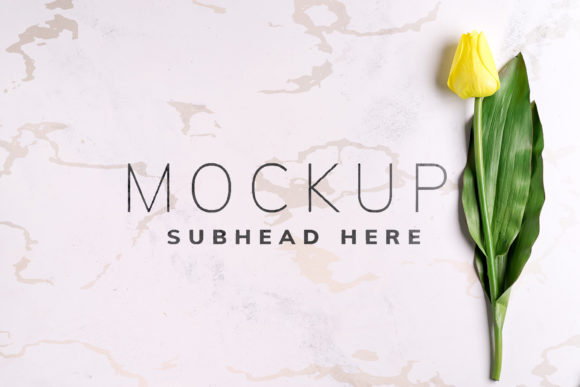
The Mockup Card with Tulips is a high-resolution Photoshop file designed to simulate a printed card featuring a floral arrangement of tulips. Unlike complex 3D renders or vector-based illustrations, this asset is a photorealistic image. It serves as a background canvas onto which designers can overlay their own artwork using Adobe Photoshop’s smart object technology. The primary purpose of this mockup is to provide a clean, aesthetically pleasing context for displaying flat design elements such as business cards, invitation cards, or small print collateral.
At its core, this tool simplifies the process of creating presentation-ready images. Instead of manually positioning shadows, lighting adjustments, and perspective corrections for every new design, users can rely on the pre-configured structure of the mockup. The inclusion of tulips adds a natural, organic element to the composition, suggesting themes of elegance, springtime, or delicate craftsmanship. However, it is important to note that the floral imagery is static; it does not interact dynamically with the placed design beyond serving as a visual backdrop.
Technical Specifications and Workflow
For designers evaluating software compatibility and output quality, the technical details of the Mockup Card with Tulips are straightforward. The file is provided in the native Adobe Photoshop format (.psd), ensuring broad compatibility with most version updates of the software. The resolution is set at 6016×4016 pixels with a density of 300 DPI (dots per inch). This specification ensures that the final rendered image is crisp and suitable for both high-quality digital display and large-format printing without pixelation.
The workflow relies heavily on the use of active smart objects. A smart object is a container that holds raster or vector data from an image. When a designer pastes their design into the designated smart layer, Photoshop automatically applies the necessary warping, shading, and blending effects defined by the mockup author. This feature eliminates the need for manual distortion tools, saving significant time during the presentation phase.
A notable feature included in this file is the "Safety Zone." In many complex mockups, placing a design too close to the edges or overlapping critical shadow areas can result in clipping or unnatural appearances. The safety zone acts as a guide, delineating the area within the smart object where the design will appear clearly and correctly. By activating the specific layer associated with these zones, designers can visualize boundaries that prevent their artwork from being obscured by shadows or folds in the card. This guidance is particularly helpful for beginners who may struggle with precise alignment and scaling.
Benefits and Advantages
The primary advantage of using the Mockup Card with Tulips is efficiency. For professionals managing multiple clients or projects, the ability to swap designs instantly via smart objects streamlines the portfolio creation process. The high resolution ensures that the output meets professional standards, while the 300 DPI guarantee supports print-ready deliverables.
Furthermore, the aesthetic appeal of the tulip theme offers a versatile neutral ground. Floral backgrounds can soften the presentation of bold, corporate logos or complement soft, pastel color palettes used in wedding invitations and boutique branding. Because the background is a photograph rather than a vector, it provides texture and depth that vector graphics often lack, making the final presentation look more tangible and realistic.
Limitations and Considerations
While efficient, this mockup has distinct limitations that designers must consider. First, because it is a photo-based mockup and not a 3D model, the perspective is fixed. Users cannot rotate the card, change the camera angle, or view the back of the card. If a project requires a multi-angle presentation, this single-view mockup will be insufficient.
Additionally, the design applied to the typography is not included. The mockup provides the environment, but the content—the actual logo, text, or graphic—must be created separately. Some users might mistakenly expect editable text layers within the floral arrangement, but these are strictly decorative elements baked into the background layer. Changing the background color or the tone of the tulips is also not possible, as the image is a flattened photographic representation. Designers requiring customizable environments or dynamic lighting adjustments will find this tool restrictive.
Ideal Use Cases and Alternatives
The Mockup Card with Tulips is best suited for designers working on projects that benefit from a soft, elegant, or nature-inspired aesthetic. It is an excellent choice for:
- Wedding and Event Stationery: Invitations, RSVP cards, and menus often pair well with floral motifs.
- Boutique Branding: Small businesses in cosmetics, floristry, or artisanal goods may find the organic feel appropriate for their brand identity.
- Quick Portfolio Updates: When speed is essential and a polished, realistic look is required without extensive post-processing.
However, there are situations where alternatives may be worth considering. If a designer is presenting a modern, minimalist tech logo, a stark white or dark gray card mockup might convey professionalism more effectively than a floral one. Similarly, if the project involves packaging that requires viewing from multiple angles, a 3D box mockup would be a more functional choice. For those needing to experiment with different background colors to match brand guidelines, a vector-based mockup with editable color layers would offer greater flexibility.
Decision-Making Insights
When deciding whether to incorporate the Mockup Card with Tulips into your workflow, consider the following questions:
- Does the aesthetic match your brand? If your client’s identity is rigidly corporate or industrial, the floral theme may clash. If it aligns with elegance or nature, it is a strong fit.
- Do you need versatility? If you require rotating views or color customization, this static photo mockup may limit your options.
- Is ease of use a priority? If you value a straightforward process with built-in safety guides for alignment, this tool reduces technical friction.
Ultimately, the Mockup Card with Tulips is a specialized tool rather than a universal solution. Its strength lies in its ability to quickly produce high-quality, aesthetically pleasing presentations for specific types of print media. By understanding its technical constraints and visual style, designers can make informed decisions about when to deploy this asset, ensuring that their final presentations effectively communicate the value of their creative work.
Thank you for considering this evaluation. Selecting the right mockup resources is a key component of professional design practice, and aligning tool capabilities with project requirements leads to more efficient and impactful outcomes.